Refund
Refund
PayCools supports initiating refunds via the Merchant Dashboard or the Refund API. You can process refunds manually in the Merchant Dashboard, or integrate refunds into your own business workflows via the API.
Refund Business Overview
What Is a Refund
- Refund path: funds are returned from the merchant account via the original channel used by the user at payment
- Refund types: full refunds and partial refunds are supported
- Trigger method: initiated by the merchant via API, or operated through the Merchant Dashboard
- Fees: depending on the specific product and channel, refunds may incur fees (please consult your sales representative)
Refund Types
| Type | Description |
|---|---|
| Full refund | Refunds the entire order amount; requires that the order has not been refunded and the refund validity period has not passed |
| Partial refund | Refunds part of the order amount; supports multiple partial refunds (cumulative amount must not exceed the original order amount) |
Multiple Partial Refund Cumulative Rule: Multiple partial refunds can be initiated for a single order. The system accumulates the refunded amount and validates the remaining refundable amount; the cumulative refund amount must not exceed the original order amount. For example, for an original order of 100, refunding 30 first and then 50 is valid; refunding another 30 would fail (only 20 remains refundable).
Refund Statuses
| Status Code | Status | Description |
|---|---|---|
| PENDING | Refund pending | The refund has been accepted and is awaiting processing; if it cannot be executed temporarily due to insufficient balance or other reasons, it will remain in this status and be retried automatically |
| PROCESS | Refund processing | The refund is being processed |
| COMPLETED | Refund successful | Funds have been returned to the user's account |
| FAILED | Refund failed | The refund failed (e.g. abnormal order, channel rejection, account issues) |
| CANCELLED | Refund cancelled | The refund order has been cancelled and will no longer be processed |
Refund Cancellation (CANCELLED): When a refund cannot be executed temporarily due to insufficient balance or other reasons, the refund order remains in PENDING (refund pending) and PayCools automatically retries at regular intervals; if it still cannot be completed (e.g. prolonged insufficient balance), the refund order will be set to CANCELLED (refund cancelled) after 7 days. Merchants can re-initiate the refund after topping up the balance.
Refund Validity and Fees
| Dimension | Description |
|---|---|
| Refund validity | Refunds are typically available within a certain time window after order settlement; the specific validity varies by channel / country |
| Refund to original channel | Funds are returned via the original channel used by the user at payment; some channels may not support this (payout must be used instead) |
| Fees | Depending on channel and product configuration, some refunds include fee reimbursement while others do not |
| Time to arrival | Depends on the original channel; usually real-time to several hours,个别 channels may be T+1 |
Due to channel restrictions and different fee-bearing party configurations, some refunds include fee reimbursement while others do not. For specific rules, please consult your sales representative.
Refund vs Void
| Dimension | Refund | Void |
|---|---|---|
| Applicable timing | Settled orders (usually have a longer refund validity) | Only orders paid the same day but not yet settled |
| Fund flow | The order has been settled; funds must be returned from the merchant account to the user | The order has not been settled; it is voided directly and funds were not actually settled to the merchant |
| Coverage | Supports a wider range of channels and countries | Currently only supports Thailand dynamic QR codes |
| Time window | A longer window after settlement | Same day, before settlement (e.g. before Thailand's 23:00 settlement cutoff) |
Use Cases
E-commerce refunds: After purchasing goods, a user requests a return and refund due to product issues or personal reasons.
- Full refund (entire order return) or partial refund (return of some items)
- Processing time: depending on the channel, usually real-time to several hours
Service cancellation refunds: A user cancels a booked service for some reason, and the amount paid needs to be refunded.
- Hotel booking cancellations, flight ticket refunds, event registration cancellations
- There may be refund time restrictions (e.g. full refund available 24 hours before departure)
- Remaining amount after deducting a penalty: partial refund
Duplicate payment refunds: Due to network issues or other reasons, a payment was made twice, and one of them needs to be refunded.
- After identifying the duplicate order, the merchant initiates a full refund for one of them
- It is recommended that merchants implement idempotency / duplicate-prevention logic to reduce such scenarios
Price adjustment refunds: After a product price change or a promotion takes effect, the price difference needs to be refunded.
- Price protection service: if the price drops after purchase, the difference is refunded
- Use a partial refund to return the price difference rather than refunding the entire order
Refund Prerequisites
Before initiating a refund, please confirm that the original transaction meets the following conditions:
- The payment method supports refunds;
- The transaction status is payment successful;
- The transaction currently has no refund being processed;
- The refund amount does not exceed the refundable amount of the transaction;
- The pending settlement balance is sufficient to cover this refund;
- If operating via the Merchant Dashboard, your account has refund permissions enabled.
Refunding via the Merchant Dashboard
- Log in to the PayCools Merchant Dashboard.
- Go to Transaction Management → Incoming Transactions.
- Find the transaction to be refunded, click Refund, and follow the on-page instructions to complete the operation.
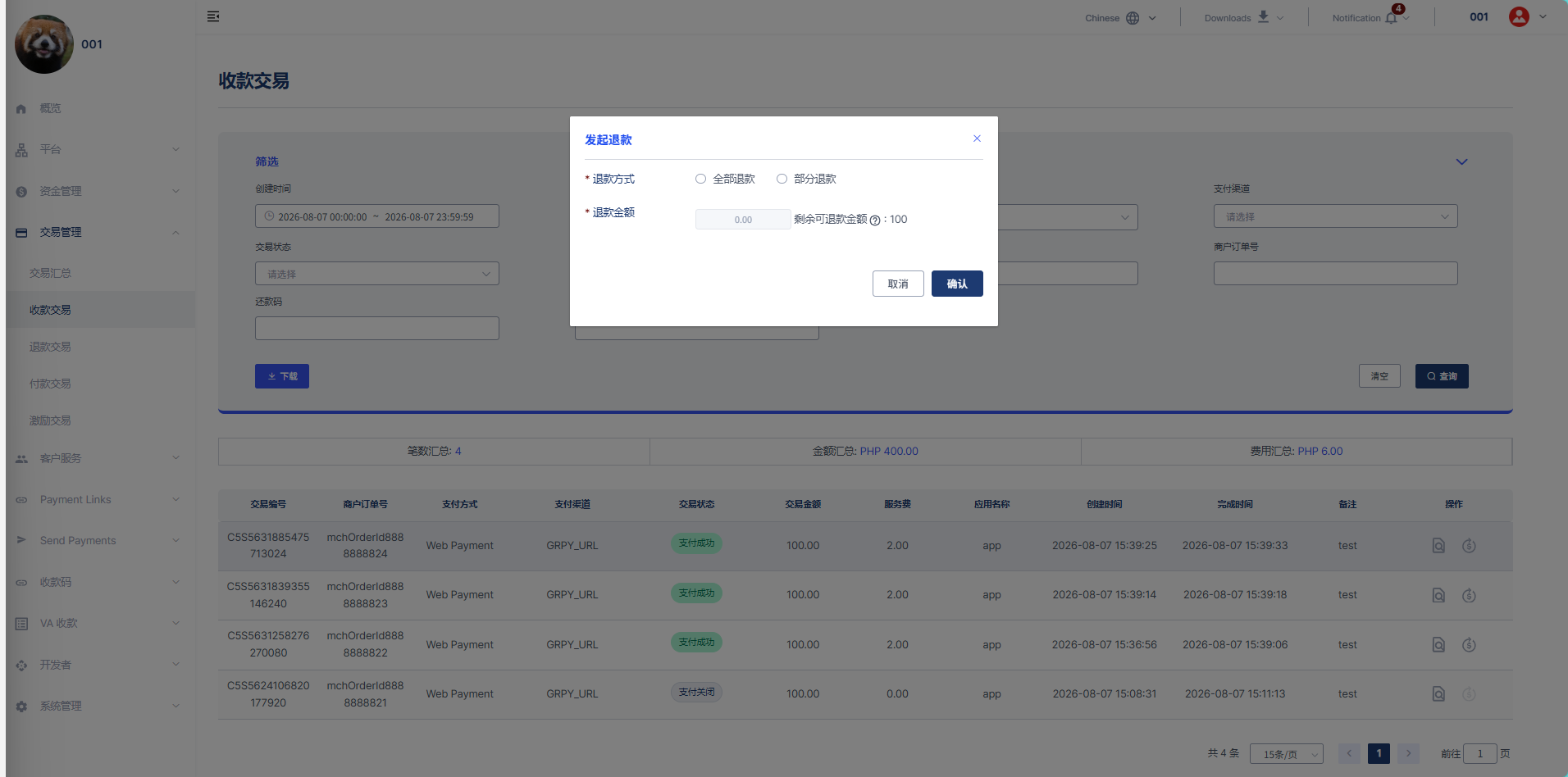
Refunds initiated from the Dashboard do not trigger callback notifications; refund progress can be viewed in the Dashboard
Refunding via the API
1. Initiating a Refund
Submit a refund request from your server, associated with the original transaction to be refunded. You need to set a unique refund order ID for this refund, and submit the refund amount and refund reason. Below is an example refund request.
curl --location --request POST 'https://globalapi-dev.paycools.com:8902/open-api/payment/refund' \
--header 'Content-Type: application/json' \
--data-raw '{
    "appId": "your appId",
    "sign": "***********************,
    "param": "{\"originalTransactionId\":\"CU5U4892099236335616\",\"mchRefundOrderId\":\"T0WRCHULVhpkJOGs\",\"refundReason\":\"testRefund\",\"refundAmount\":100,\"countryCode\":\"PH\",\"refundCallbackUrl\":\"http://www.test.com\",\"timestamp\":1722415059}"
}'
{
  "code": 10000,
  "message": "Success",
  "data": {
     "mchRefundOrderId": "UDzQ37ruxde2T6vuy",
     "refundTransactionId": "R2104894311513591808",
     "refundCreateTime": "2026-09-29 19:21:26",
     "refundAmount": 100,
     "refundStatus": "PENDING"
  }
}
After PayCools receives the refund request, it returns the refund order information and the current refund status. Successful acceptance of the refund request does not mean the refund has been completed.
2. Confirming the Refund Result
After submitting the refund request, you can confirm the refund status via the refund result notification or by actively querying, and update your refund records accordingly. While the refund is still processing, please wait for the final result. Once the refund status is updated, PayCools will send the refund result to the notification URL you configured. After receiving the notification, please verify the signature and update your refund records.
{
    "param": "{\"eventName\":\"payment.refund.success\",\"feeRefunded\":0,\"mchRefundOrderId\":\"UDzQ37ruxde2T6vuy\",\"originalTransactionId\":\"CU5U4892099236335616\",\"refundAmount\":100,\"refundCreateTime\":\"2026-09-29 19:21:26\",\"refundReason\":\"testRefund\",\"refundReturnTime\":\"2026-09-29 19:38:04\",\"refundStatus\":\"COMPLETED\",\"refundTransactionId\":\"R2104894311513591808\"}",
    "sign": "*******************"
}
{
  "code": 10000,
  "msg": "string",
  "data": {}
}