Local Payout Overview
Local Payout Overview
PayCools Local Payout sends funds to a recipient's local wallet or bank account.
PayCools Local Payout Solution
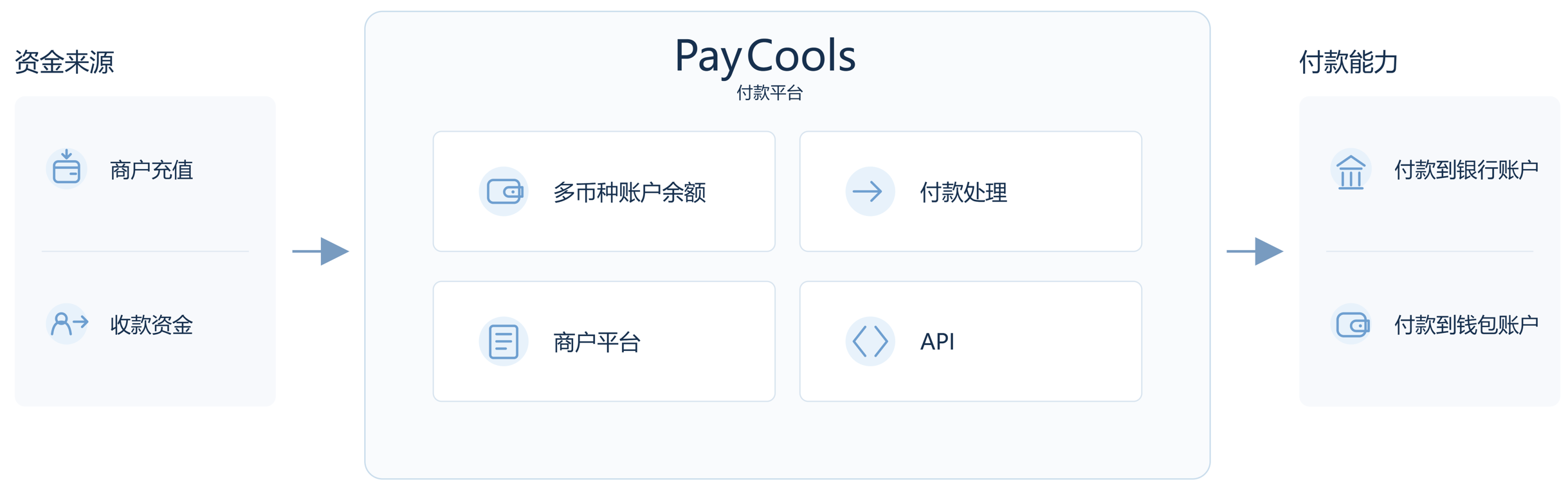
PayCools Local Payout lets merchants pay local recipients in the local currency to local bank accounts or wallets, supporting user withdrawals, supplier payments, commissions, and similar needs.
What Is a Payout?
A payout is a payment from a merchant's account balance to an account provided by a third-party user. The merchant pays an external user through the platform rather than withdrawing funds to itself.
| Dimension | Description |
|---|---|
| Source of funds | Merchant PayCools balance, from acquiring settlement proceeds and top-ups |
| Amount deducted | Payout amount + fee; the available balance must be sufficient |
| Recipient account | Local bank account or e-wallet provided by a third party |
| Initiation | API or manual initiation in the Merchant Dashboard |
Process: The merchant submits the recipient account → the platform sends funds as instructed → the merchant balance is debited on success.
Payouts validate only the recipient account number and do not verify whether the recipient name is correct or real. A correct account number is sufficient; an incorrect name usually does not affect the result. To confirm the account holder name in advance, use Account Verification.
Key Advantages
- Direct local reach: Connect to local banks and wallets and pay in the local currency.
- One integration, multiple countries: Cover the Philippines, Indonesia, Malaysia, Thailand, Mexico, and more without connecting to each channel separately.
- Flexible initiation: Single or batch payouts through APIs or the Merchant Dashboard.
- Transparent processing: Asynchronous notifications and a query API make status trackable; failed funds are returned automatically.
Use Cases
Platform Refunds
Refund users to a bank account or wallet when an original-route refund is not available.
- Supported in multiple Southeast Asian countries
- Arrival from real time to several hours
- Users bind a recipient account on the refund page
Supplier Settlement
E-commerce and SaaS platforms settle funds with suppliers or partners regularly.
- Deduct commission after order completion and settle the remainder
- Batch payouts to multiple suppliers
- Local bank accounts and e-wallets
Commission and Income
Ride-hailing, delivery, and freelance platforms pay service providers.
- Driver income after order completion; daily rider settlement
- High frequency and volume; batch and real-time payouts
- Bank cards and wallets such as TrueMoney and GCash
Points and Rewards
Users withdraw points or campaign rewards to a personal account.
- Convert points to cash and pay out
- Instant small rewards for check-ins and referrals
- Bank cards and e-wallets; mobile top-ups in some cases
Cross-Border Payments
Cross-border platforms pay overseas users, partners, and suppliers.
- Royalties to Philippine users; supplier payments in Southeast Asia
- The Philippines, Malaysia, Indonesia, Thailand, Mexico, and more
- One integration covers multiple local networks
Payroll
Enterprises pay salaries or service fees to local employees and part-time workers.
- Batch payouts for monthly or weekly payroll
- Local bank accounts and e-wallets
- Combine with statements for accounting
Business Flow
- The merchant selects a payout method and submits the recipient account; the amount and fee are deducted from the PayCools balance.
- PayCools submits the request to the payout channel.
- The channel processes the payout and returns the result.
- PayCools updates the status and synchronizes it through an asynchronous notification or the query API.
- The merchant updates the order based on the final status.
A payout cannot be revoked once submitted. Do not mark the order as successful or failed before the final result is received.
Payout Modes
Small-Value and Large-Value
| Mode | Description | Typical Countries |
|---|---|---|
| Small-value payout (single) | Within the channel's single-transaction limit | The Philippines, Malaysia, Thailand, and more |
| Large-value payout | Requires enablement by your account manager; in the Dashboard, add and approve a large-value beneficiary first | The Philippines (≥ 50,000 PHP) |
Large-value payouts are disabled by default. The system does not split payouts automatically: split an amount into multiple small-value requests yourself, or enable large-value payouts and submit it as one transaction.
Single and Batch
| Dimension | Single Payout | Batch Payout |
|---|---|---|
| Initiation | One transaction through the API or Dashboard | Batch file in the Dashboard / batch API |
| Scale | 1 transaction | Tens to thousands |
| Typical use | Single withdrawal, instant refund | Supplier settlement, payroll, commissions |
| Reconciliation | By transaction ID | Batch summary + details |
| Arrival | Channel-dependent, usually real time | Determined by the slowest transaction |
Payout Status and Arrival Time
Payout Status
| Status | Description |
|---|---|
| Processing | PayCools accepted the request and is sending it to the channel |
| Successful | Funds reached the user's account |
| Failed | Remittance failed (incorrect account, insufficient balance, channel rejection, etc.) |
Arrival Time
| Channel Type | Arrival Time | Operating Hours |
|---|---|---|
| E-wallets (GCash / Maya / TrueMoney / DuitNow) | Real time (seconds to minutes) | 24/7 |
| Real-time bank transfers (InstaPay / DuitNow / PromptPay / BI-FAST / SPEI) | Real time (seconds to minutes) | 24/7 |
| Batch bank transfers (PESONet / IBG, etc.) | Same day to next business day | Business days |
Relationship with Other Products
- Acquiring: Money in, from user to merchant.
- Refunds: Return funds for an original payment through the original method; a payout is unrelated and can be sent to any account.
- Split payments: Split an acquiring transaction to multiple PayCools merchant recipients before settlement; payouts send funds to any local bank or wallet account.
Risk Control and Failure Handling
| Failure Reason | Description | Recommended Action |
|---|---|---|
| Incorrect recipient account | Incorrect, nonexistent, or mismatched account | Verify and retry (the name does not affect the payout) |
| Insufficient merchant balance | Balance cannot cover amount + fee | Top up and retry |
| Risk control block | Blocked by a risk rule | Contact your account manager |
| Channel unavailable | Channel maintenance or unreachable | Wait and retry |
For error codes (failedCode / failedMessage), see General Payout Rules · Error Codes. Failed payouts return funds to the merchant account. Use the final asynchronous status, not a synchronous response, as proof of success.